Easier Python database access using a dictionary
More on the Façade pattern

No. 18
In our earlier article, we demonstrated how the Façade pattern simplifies accessing databases in Python. Our Façade reduced accessing database to just four classes: Database, Table, Query and Results. In this article we are going to add to the Query and Results classes to make the Results easier to use.
When you do a query using Python’s ODBC connection to databases (we have tested both MYSQL and Sqlite, but any common database works) Python returns the results as an array of tuples. So in our simple Grocery Store App, we issue a query to find the lowest price of grocery as shown in this figure
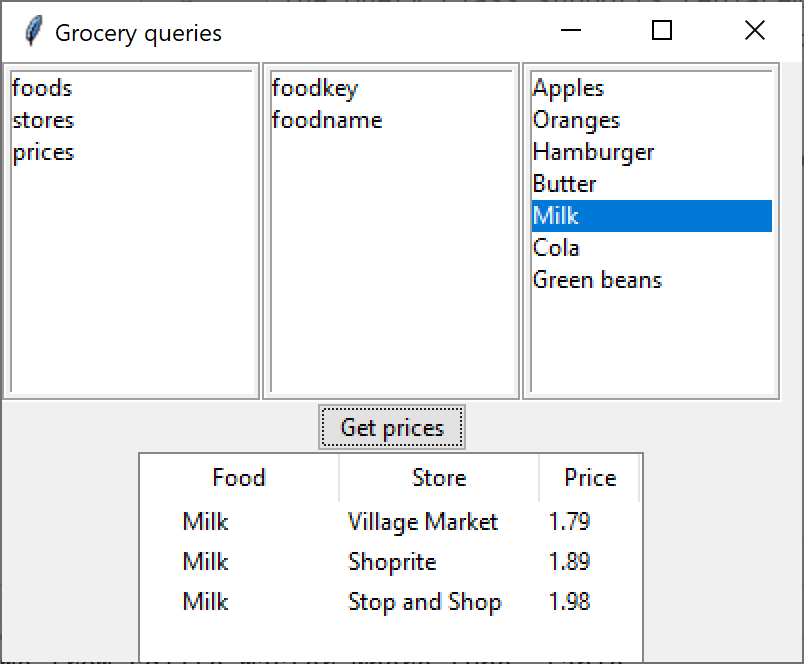
The SQL query that the program issues is
select foods.foodname, stores.storename, prices.price from prices join foods on (foods.foodkey=prices.foodkey)
join stores on (stores.storekey = prices.storekey )
where foods.foodname='Milk' order by price
The results that Python returns are an array of tuples that looks like this:
[('Milk', 'Village Market', 1.79),
('Milk', 'Shoprite', 1.89),
('Milk', 'Stop and Shop', 1.98)]
For this simple query, it is pretty obvious which column of each tuple is which, but it would be better if each result was labeled with the column name.
Instead, what we have to do here to load the Treeview is insert the results, assuming we know the column order:
results = self.query.execute()
rows=results.getRows()
index = 1 for row in rows:
tree.insert("", index, text=row[0],
values=(row[1], row[2]))
index += 1This gets even worse if you are displaying ten or more columns from a query like this one:
SELECT personkey, frname, lname, address, town, state, zipcode, email, phone, phone2 FROM tpatrons.patrons order by lnameThere, to load the Treeview table we have to set up an iterator:
index = 0
for r in rows:
     riter = iter(r)
     self.tree.insert("", index, text=next(riter),
     values=(next(riter),
       next(riter), next(riter), next(riter), next(riter),
       next(riter), next(riter), next(riter), next(riter)))
     index = index + 1
That is just barely comprehensible. So let’s consider a better solution.
Creating Results as a Dictionary
Let’s suppose that instead of a tuple, our Results class returned a dictionary with every column labeled. In that case, our grocery result would look like this:
[{'foodname': 'Milk', 'storename': 'Village Market', 'price': 1.79}, {'foodname': 'Milk', 'storename': 'Shoprite', 'price': 1.89}, {'foodname': 'Milk', 'storename': 'Stop and Shop', 'price': 1.98}]This isn’t so hard to do, because we know the column order from the query itself. We just have to create a list of those column names and use them to take the tuple and convert to to a dictionary.
Consider that in this simple case, the beginning of the query is
select foods.foodname, stores.storename, prices.price from prices
And, that is all we need. We just need to parse these table names from the SQL and store them in an array ( a List in Python terms). Then for every row, we extract the elements of the tuple, prefix it with the column name and insert it into a Dictionary.
The process is pretty straight forward.
We pull the space-separated tokens out one at a time, stripping off the trailing comma until we encounter the ‘from’ keyword.
We create a new array which skips of over SELECT (and DISTINCT)
If any element contains a period, we eliminate the table name and the period
If any element contains a comma, there are two column names that were not separated by a space, and we divide them into two entries.
All of this takes place in a single little function that returns that array of column names:
    def getColumnNames(self):
        # make list of tokens
        qlist = self.query.lower().split(' ')
        # remove trailing commas and stop at first SQL keyword
        newq = []
        i = 0
        quit = False

        # remove trailing commas and stop on FROM
        while i < len(qlist) and not quit:
            ql = qlist[i].strip().removesuffix(',') #remove trailing
            if ql in {'from', 'join', 'where', 'inner'}: #stop on SQL
                quit = True
            else:
                if ql not in { 'distinct', 'select'}:
                    newq.append(ql)     #insert name in column list
            i += 1

        # now remove leading table names
        # and split where there was a comma but no space
        newq2 = []
        for ql in newq:
            if '.' in ql:
                qa = ql.split('.')  # remove table name
                ql = qa[1]
            if ',' in ql:
                qa = ql.split(',')  # split at comma
                newq2.append(qa[0])  # when there is no space
                newq2.append(qa[1])  # between column names
            else:
                newq2.append(ql)
        return newq2            # return the column name array
The execute method of our Query class calls this function which is part of the revised Query class and then creates a Results object which it passes that array to.
   # executes the query and returns all the results
    def execute(self):
        #print (self.qstring)
        self.getCols = ColumnNames(self.qstring)
        self.colNames = self.getCols.getColumnNames()
        self.cursor.execute(self.qstring)
        rows = self.cursor.fetchall()
        return Results(rows,  self.colNames)
Results creates the Dictionary
The Results class now has something more useful to do as it takes the tuple and the array of table names and uses them to create the results dictionary:
# contains the result of a query
class Results():
    def __init__(self, rows, colNames):
        self.rows = rows
        self.cnames = colNames
        self.makeDict()

    # create an array of dictionary rows
    def makeDict(self):
        self.dictRows = []

        for r in self.rows:
            self.makeDictRow(r)

    # make one dictionary row
    def makeDictRow(self, row):
        niter = iter(self.cnames)   # iterate thru the names
        dict = {}                   # make a dictionary
        for r in row:
            dict[next(niter)] = r   # make dict entry
        self.dictRows.append(dict)  # append each to dictionary

    def getRows(self):
        return self.rows        # just returns the tuple

    def getDictRows(self):
        return self.dictRows    # returns the dictionary
Note that the Results object contains both the original tuple result and the new dictionary result, so it is backwards compatible.
Here is the simpler way we can now load the table using the column names:
index=0 for row in dictRows:
     tree.insert("", index,
                 text = row.get('foodname'),
                 values=(row.get('storename'),                         row.get('price')))
Note that this completely eliminates dependency on the order of the columns in the query. We can fetch or skip columns in any order, since we can access them by name. This is even more powerful in the case of the address table display we illustrated above. We can now load all those columns by name, too!
index = 0
for r in dictRows:
     self.tree.insert("", index,
     text= r.get('personkey'),
     values=(r.get('frname'),
             r.get('lname'),
             r.get('address'),
             r.get('town'),
             r.get('state'),
             r.get('zipcode'),
             r.get('phone'),
             r.get('email')))
     index += 1
Further, you should note that our parsing of the SQL needn’t be perfect. If a few more tokens get added to the list, they will never be used, since the length of the query result determines how many are used.
In summary, creating the query results as a dictionary makes it simpler to access the results, and gives you the opportunity to use them in an order different from that provided in the query result.
You can download all code from GitHub under jameswcooper/newsletter.
Subscribe to this newsletter so you don’t miss a single Monday’s issue!