Using threads to improve our countdown program
No. 35

In our previous article, we designed some classes and a tkinter user interface to display an hour-minute-second countdown program.
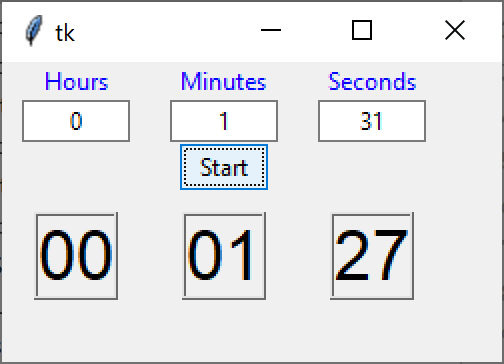
However, if you run this program, you will find that it is somewhat hard to stop, because much of the time is spent in a sleep mode thread that you can’t interrupt easily. And for some puzzling reason, you get an error message from the tkinter code because you can only stop it with the X box in the corner of the window, and things don’t get terminated cleanly.
So, we devised a slightly different approach where the Mediator starts a thread which calls the doCount method, rather than calling it directly. This simple change makes quite a difference:
You can see the change here. Note that the call to doCount is commented out and replaced with 2 lines that start a thread.
def startCount(self):
entry = self.hrEntry.get() + ',' + self.mnEntry.get() + "," \
+ self.secEntry.get()
    hms = Hms(entry)
if hms.error:
messagebox.showerror('Error', hms.errorMessage)
else:
x = threading.Thread(target = self.doCount(hms))
x.start()
#self.doCount(hms)
The doCount method is much the same as before:
def doCount(self, hms):
while hms.totalSeconds > 0:
h, m, s = hms.makeHms()
self.hrDisp.configure(text=f'{h:02}:')
self.minDisp.configure(text=f'{m:02}:')
self.secDisp.configure(text=f'{s:02}')
self.root.update() # updates screen before sleep
time.sleep(1)
When you run this new version, called CountdownThreads.py, you will find that it responds much more quickly to closing the program using that X box.
However, when you stop this program, you still get error messages from tkinter because when you try to stop it, the other threads are still running.
So, the best way to handle this is to add a stop button which stops that doCount thread immediately. Then clicking on the X box will terminate tkinter and the Python program correctly. It looks like this:
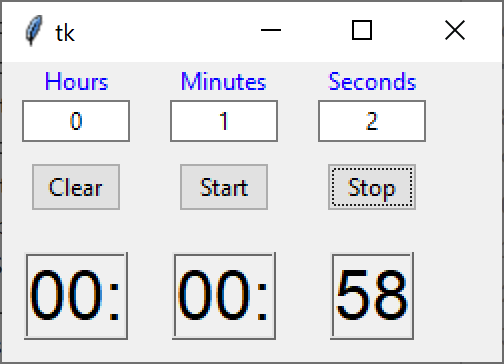
This stop button sets a flag in the Mediator, which can be checked by the doCount thread. Here’s the button. Remember, that we created a bas DButton class which contains the base comd method and calls it when clicked.
class StopButton(DButton):
def __init__(self, root, med):
super().__init__(root, text='Stop')
self.med = med
self.root = root
def comd(self):
print('stopping')
self.med.stopRequest = True
Then, the only thing we have to change is having the doCount routine check to see if the stopRequest flag has been set in the Mediator:
def doCount(self, *args):
hms = args[1]
med = args[2]
while hms.totalSeconds > 0 and not med.stopRequest:
h, m, s = hms.makeHms()
self.hrDisp.configure(text=f'{h:02}:')
self.minDisp.configure(text=f'{m:02}:')
self.secDisp.configure(text=f'{s:02}')
self.root.update() # updates screen before sleep
time.sleep(1)
This allows you to stop the countdown thread and then exit cleanly from the program.
Python Programming with Design Patterns
My new book on Python Programming with Design Patterns came out in late December, and is now available on Amazon and Barnes and Noble. It’s published by Pearson.
All of the source code can be found in GitHub under jameswcooper/newsletter/Countdown
Code includes:
HmsSimple.py-- Hms class without error checkin
CountDownSimple.py – Simple countdown without error checking
Hms.py – complete Hms class with error checking
Countdown.py – complete countdown with error checking
CountDownTk.py – Visual countdown program
CountDownTkThreads.py — Countdown using threads
CountDownTkThreadsStop — Countdown with stop button.